How a markdown middleware burned my Workers free tier
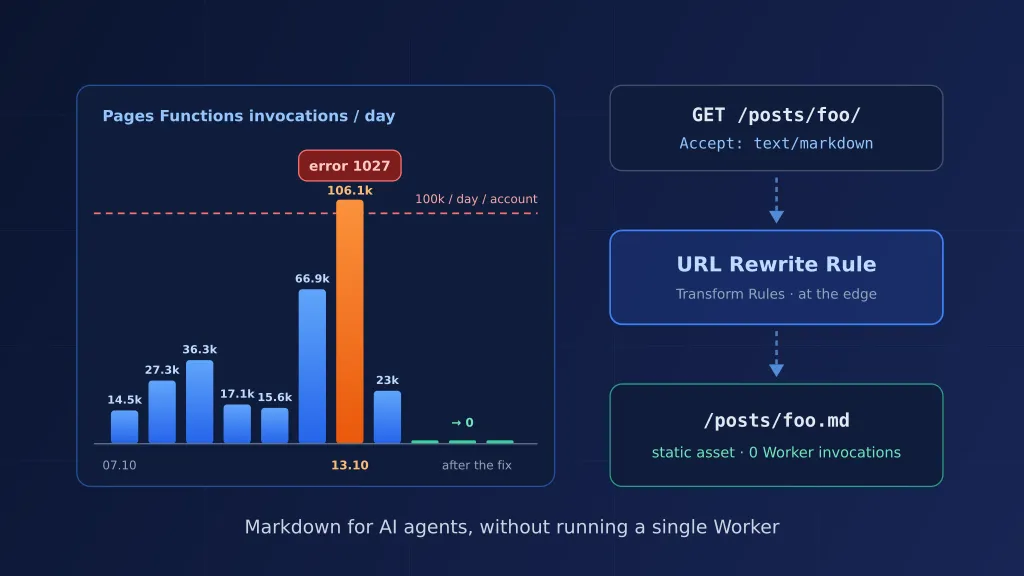
On 13 October my blog used up the whole daily Workers quota of my Cloudflare account. A static blog. No backend, no database, nothing that should ever need compute. This is the story of why it happened, how the blog now serves markdown to AI agents without running a single Worker, and who was hammering the site.
The symptom: 100k invocations on a static site
The Workers free plan gives you 100,000 requests per day. The limit is per account, not per Worker. When you hit it, Cloudflare returns error 1027 until midnight UTC – for every Worker on the account. In my case that meant not only the blog, but also my private portal and a small app that university students use for one of their courses.
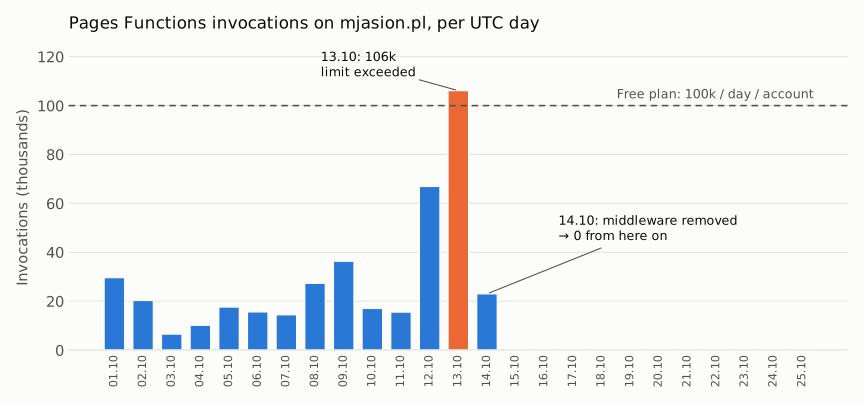
Pages Functions invocations on mjasion.pl went from 14.5k on 7 October to 66.9k on the 12th and 106.1k on the 13th. Everything else on the account together stayed under 4k a day. After 14 October the bars simply stop.
The cause: _middleware.ts on every request
The blog is a static Astro site on Cloudflare Pages. Every page has a markdown twin (/posts/foo/ → /posts/foo.md), plus /index.md and /llms.txt, so AI agents can read the content without parsing HTML. To make this work with content negotiation – send Accept: text/markdown, get markdown back from the normal URL – I had added functions/_middleware.ts.
A Pages middleware with no _routes.json runs on every request. HTML, CSS, images, favicon, the lot. Each one is a Worker invocation. On a quiet blog that is invisible. On a blog that someone decides to scan, it is a quota.
The fix went out on the morning of 14 October as a one-line commit message: remove Pages middleware to stop exhausting Workers limit. Invocations went from 5–6k per hour to 100 at 05:00 UTC and to zero from 06:00 UTC.
How markdown is served now: three URL Rewrite Rules
Content negotiation did not need a Worker in the first place. Cloudflare Transform Rules can rewrite the path based on a request header, and they run at the edge before the request reaches Pages. The markdown files are already static assets in the build, and Pages serves static assets for free and without limit.
Three rules in Rules → Transform Rules → URL Rewrite:
1. Homepage
http.request.uri.path eq "/"
and any(http.request.headers["accept"][*] contains "text/markdown")
Rewrite path to static /index.md.
2. Pages without a trailing slash (/now → /now.md)
not ends_with(http.request.uri.path, "/")
and not http.request.uri.path contains "."
and any(http.request.headers["accept"][*] contains "text/markdown")
Rewrite path, dynamic: concat(http.request.uri.path, ".md")
3. Pages with a trailing slash (/posts/foo/ → /posts/foo.md)
ends_with(http.request.uri.path, "/")
and http.request.uri.path ne "/"
and not http.request.uri.path contains "."
and any(http.request.headers["accept"][*] contains "text/markdown")
Rewrite path, dynamic: concat(substring(http.request.uri.path, 0, -1), ".md")
The not contains "." condition keeps assets (.js, .webp, .xml) out of the rewrite. All three expressions work on the Free plan – no regex needed.
Try it:
curl -s -H 'Accept: text/markdown' https://mjasion.pl/ | head
curl -sI -H 'Accept: text/markdown' https://mjasion.pl/now/ | grep -i content-type
Keeping the twins out of search results
Every page now exists twice. Search engines should only index the HTML, while agents should still read the .md – which is exactly what noindex does. In static/_headers:
# Markdown twins of every page – keep them out of search results.
# Accept: text/markdown requests are rewritten to the .md path at the edge
# before they reach Pages, so this rule covers negotiated responses too.
/*.md
  X-Robots-Tag: noindex
Because the rewrite happens before Pages, the header applies to both /posts/foo.md and /posts/foo/ requested with Accept: text/markdown. And since the same URL now returns two different representations, Vary: Accept tells intermediate caches not to mix them up:
/*
  Vary: Accept, Accept-Encoding
Cloudflare’s own cache is not affected – the rewrite changes the path before the cache lookup – but a corporate proxy might be.
Who was hitting the site
That fixed the bill. It did not explain why a quiet blog suddenly needed 100k invocations a day.
Last 7 days before the fix: 505k requests, 410k of them to /. Cache hit rate: 0.2%.
A scanning campaign from Google Cloud (AS396982) – 75–90% of all traffic every day. Between 12 and 14 October alone, 181 GCP addresses sent 382k requests and pulled 8.4 GB.
(Per-day counts in this post come from Cloudflare’s adaptive HTTP analytics; the dashboard’s default daily rollup shows about 10% less.)
Anatomy of the campaign
Timeline
| When | What happened |
|---|---|
| 11.10 | 36k requests from 86 GCP addresses |
| 12.10, ~06:00 UTC | The real ramp-up: 97k requests from 96 addresses |
| 13.10 | 153k from 114 addresses – the blog’s middleware crosses 100k invocations |
| 14.10 | Middleware removed; 132k from 108 addresses keep coming |
| 15.10 | Peak: 269k requests on the blog, the new WAF rules start biting |
| 19–20.10 | Moves to my other domains – ~118k requests in two days on a parked one |
The peak rate I measured was about 890 requests per minute from a single address.
Fresh cloud machines every day
The addresses came from the usual Google Cloud pools (34.x, 35.x, later 136.8x–11x) in Asia, Europe and North America – and the top address was different every day. On AbuseIPDB, each one’s report history started on the very day it started scanning me, with dozens of reports from other site owners and nothing older. Whoever runs this gets clean, reputation-free machines daily, so blocking IPs one by one is pointless; you have to match on behaviour or on the network.
One client, thirty-four names
A single address, 34.87.51.216, sent requests under 34 different User-Agents, each about 800 times – GPTBot, ClaudeBot, Googlebot, PerplexityBot and thirty more – plus thousands of plain Chrome/153 on Windows. When that started getting challenged, a mobile Pixel 6 variant showed up.
None of it was what it claimed to be:
- Real Googlebot and bingbot do not crawl from rented Google Cloud VMs in Singapore.
- The fakes never fetched
robots.txt– the one file a real crawler asks for first. - They never loaded CSS, JS or images. 96% of requests were
GET /– the 33 KB homepage HTML, again and again. - Cloudflare did not recognise any of them as a verified bot (
cf.client.botwas false).
The most likely reason for the costume: checking whether a site lets “AI bots” through when it blocks everything else. A lot of sites now do.
What it was looking for
Between the homepage hits – a few thousand probes on each domain:
- secrets and credentials:
.envin every variant,.git/config,id_rsa,.aws/credentials,firebase-service-account.json,.azure/accessTokens.json; - path traversal:
/static/..;/..;/proc/self/environ,/assets../.env, and a Vite source-map trick (/__vite_rsc_findSourceMapURL?filename=…/.aws/credentials); - exploits: React2Shell (CVE-2025-55182) payloads against React Server Components, plus WordPress, Grafana and Apache probes.
On a static site none of this exists, so it all ended as 404 or – once the rules were in – 403. Nothing leaked. But the list is a good checklist of what not to have publicly reachable on anything you run.
It went for everything
The blog was only where I noticed it, because that is where it cost something. The same campaign hit all ten of my domains on Cloudflare, often from the same address within the same hour.
The worst-hit was a parked domain with no working site at all: ~118k requests in two days. It had a proxied wildcard DNS record (*), so every invented subdomain resolved – and the scanner happily enumerated mail., sentry., portainer., cpanel.… Lesson: delete wildcard records you do not need; they turn your zone into an infinite target list.
Who is behind it
I don’t know – only Google knows who rents those machines. It looks like a later wave of something already described: in August a Hacker News thread collected site owners seeing fake ClaudeBots, and GreyNoise traced forged AI crawler names to 824 addresses sharing one HTTP client fingerprint – never asking for robots.txt, going for the same files as mine. Nobody has named an operator.
What is clear: I was not a target. I was a row in a list of every reachable host. The payloads alone prove it: React2Shell exploits for React Server Components and WordPress probes for PHP, fired at a static Astro site that runs neither. I had posted about the blog on X around then, but the timing was a coincidence – the ramp-up started 14 hours before that post.
Telling a fake bot from a real one
- Trust
cf.client.bot, not the User-Agent. Cloudflare verifies real crawlers by IP ranges and reverse DNS. Every bot rule I wrote hasnot cf.client.botin it, so Googlebot and the real GPTBot pass and the costumes don’t. - Never allow-list by User-Agent. A rule like “let in anything that says
Claude-User” lets in exactly this scanner – it was rotating those names. - Allow real agents by their published ranges – and check who announces them. Anthropic documents
160.79.104.0/21for its outgoing requests (MCP tool calls, web fetch). Cloudflare Radar shows that /21 split between Anthropic’s AS399358, Google Cloud’s AS396982 and Amazon’s AS16509, so an ASN rule against GCP or AWS also catches real Claude. My GCP rule on the blog challenged the real Claude-User; on my app domain the rule now carriesnot ip.src in {160.79.104.0/21}. - Look at behaviour. No
robots.txt, no assets, hundreds of hits on/per minute,POSTandDELETEon a static page – no human or honest crawler does that.
Stopping the scanner
Removing the middleware made the traffic free. It did not make it go away. On the Free plan you get five custom WAF rules and one rate-limiting rule per zone. During the campaign (14–17 October) the blog ran with these:
- Sensitive paths – block.
.env,.git,.aws,.ssh,.azure,.docker,.config,..,*secrets*. Nobody legitimate asks for these. - Countries – managed challenge for regions with no readers and lots of scanning.
- Unknown bots – managed challenge on
/for anything withbot,spiderorcrawlerin the User-Agent that isnot cf.client.bot. - Cloud scanner – managed challenge for AS396982, empty User-Agents and anything other than
GET/HEAD/OPTIONS, with the feed,robots.txtand the sitemap exempt. - Rate limit on
/per IP, set well above anything a human or an honest crawler does.
The wildcard operator is available on Free; matches (regex) is not. The bot rules covered only / on purpose: the scanner hit the homepage 96% of the time, while legitimate agents read posts and .md files.
The share of scanner requests that got a 200 went from about 65% before any rules, to 20% after the first round, to under 2% after extending the bot rule.
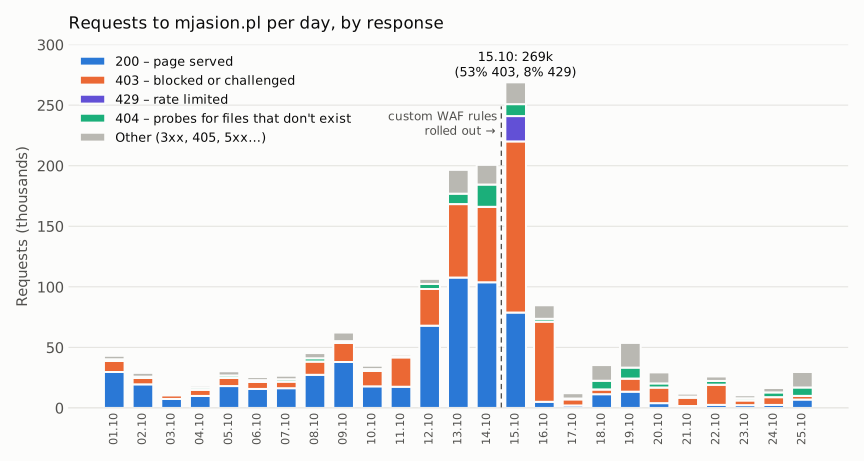
The 403s before 15 October came from rules I already had: a country rule (Taiwan, one of the scanner’s GCP regions, was on the list) and Bot Fight Mode. A managed challenge is a 403 too, so on the chart “403” means “blocked or challenged”.
The busiest day came after the fix: 269k requests on 15 October, but 53% of them ended as a 403 and another 8% as a 429. Before and after:
| 13–14.10 | 21–25.10 | |
|---|---|---|
| Requests per day | ~197–201k | 10–30k |
| 200 responses per day | 104–108k | 1.6–6.9k |
| Bandwidth per day | ~2.5 GB | 0.07–0.16 GB |
| Workers invocations from the blog | 106k / 23k | 0 |
Once the scanner had moved on, I loosened the blog again. Sensitive paths, countries and the rate limit stay; the bot rule now guards only my private photo album and the Google Cloud rule is off. My app domain, which has logins and APIs, keeps the cloud-ASN rule with the Anthropic exception.
Eleven days after the peak, the blog is down to ~18k requests a day. Google Cloud is about 14% of it – 80 addresses that still try, mostly without luck – and the blog’s production deployment hasn’t run a single Worker since 14 October.
What helped the most: Claude with the Cloudflare MCP server
I did not dig through this by hand. Almost the whole investigation ran in Claude, connected to my Cloudflare account through MCP, while I made the changes in the repo and the dashboard.
The Cloudflare Developer Platform connector I started with sees no traffic, WAF or DNS, so the real work fell to the full Cloudflare MCP server. It works in code mode: two tools, search over Cloudflare’s OpenAPI spec and execute, which runs a short JavaScript function against the whole API. One call can pull GraphQL analytics, WAF rulesets and DNS records together – that is where every chart and per-day number in this post comes from.
The part I did not expect: reading the live config back, it caught my mistakes.
- A WAF rule I thought I had saved still had the old expression.
- Exceptions written as
index.xmlinstead of/index.xmlwould never match. - An
X-Robots-Tagrule sat in the request phase, where it does nothing – it has to be a Response Header Transform Rule. - The new rate limit blocked exactly one IP – mine, testing the site in Development Mode.
What made that work was one question after every change: how does the traffic look now? A check minutes later showed whether a rule bit; a check a day later caught the rate limit hitting a human and the rule that was never saved. The findings went into a running note in a Claude Project, so each check started from the last state.
Changes stayed with me: it proposed rules and DNS edits, I applied them.
What I took away from it
- Never run a Pages middleware without
_routes.json. If you need Functions, scope them to the paths that need them. If you can do it with a Transform Rule, do it with a Transform Rule. - The Workers limit is per account. A runaway static site can take down unrelated apps.
- Check that Pages Functions fail open. With
fail_openon (deployment_configs.production.fail_openin the API), a quota overrun should fall back to the static site instead of returning 1027. - A spoofed AI bot User-Agent is not an AI bot. Trust
cf.client.bot, and let real agents in by their published IP ranges, never by name. - Cloudflare won’t punish you for being a target. Exceeding Workers quota means errors until midnight UTC, not a suspended account. DDoS protection and WAF actions don’t count towards any limit.
Further reading

Senior SRE & Platform Engineer